Consolidated companies refer to a parent company and its subsidiaries presenting their financial results as a single entity, as required by the Companies Act 2014 in Ireland and international standards (IFRS).
This process combines assets, liabilities, and equity, eliminating intercompany transactions to give a "true and fair" view of the group's financial performance.
Consolidation refers to the aggregation of financial statements of a group company as consolidated financial statements.
Big Red Cloud allows the option to manage companies in this manner.
You select your main source company when created a Consolidating Company so that you can create the initial Chart of Accounts (COA) based on the main company and run consolidated reports for the group of companies.
This will keep the COA the same on both companies and allow you to run nominal reports from the main company for the consolidating company/companies.
To set up a consolidating company or companies you would select the option on the right:
1. "Add Consolidating Company"
2. Select the source or parent company (Main Company)
3. Give your new company a name and click Save.
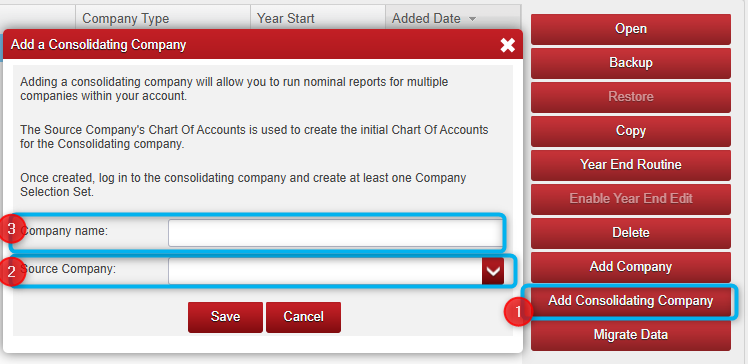
Note: When complete, the new (or child) company will show Consolidating Company under the Company Type Column.

Please note:
Both companies will need to share the same financial year for you to be able to use the Main Company to run any of the consolidated reports.
If a Year End Routine has been performed on one but not yet on the other, these reports will not work until it has been performed on them both (or more if there is more than one consolidated company).

Was this article helpful?
That’s Great!
Thank you for your feedback
Sorry! We couldn't be helpful
Thank you for your feedback
Feedback sent
We appreciate your effort and will try to fix the article