WARNING: There instructions are for running a Year End Routine in Big Red Cloud. Running a Year End Routine in Big Red Book involves different steps.
Note: in many of the books you will see the months of your financial year along the top of the screen. To the right of them are tabs 13, 14, and 15. These are Months 13, 14, 15.

For example, if your financial year runs From January 2025 To December 2025, then 13 would be January 2026, 14 would be February 2026, and 15 would be March 2026.
When you run a Year End Routine in Big Red Cloud:
- All transactions posted to Month 13 will then show in Month 1 of the new year.
- All transactions posted to Month 14 will then show in Month 2 of the new year.
- All transactions posted to Month 15 will then show in Month 3 of the new year.
This allows you to post to the first 3 Months of your next Financial Year before you run your Year End Routine.
Steps for running a Year End Routine in Big Red Cloud:
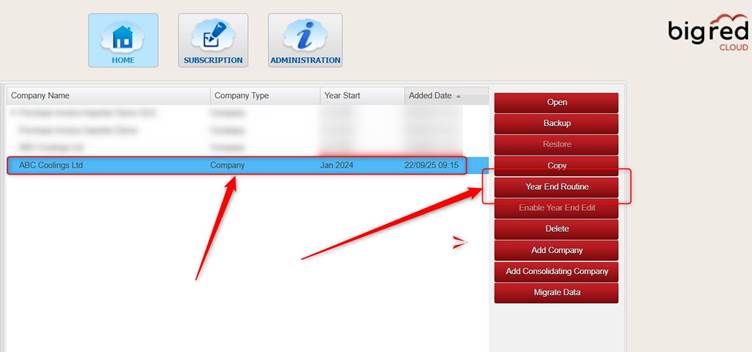
On the Company Selection screen, highlight the company that you want to run a Year End Routine on > click Year End Routine.
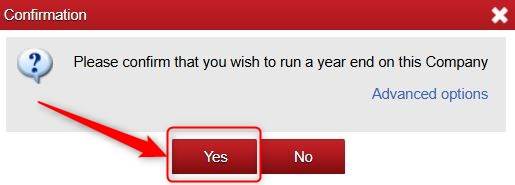
click Yes.
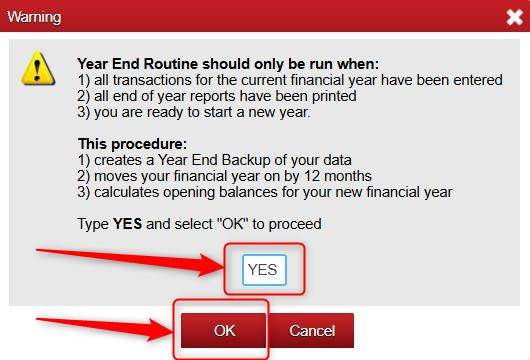
Ensure to read the message in full > type YES > and click OK.
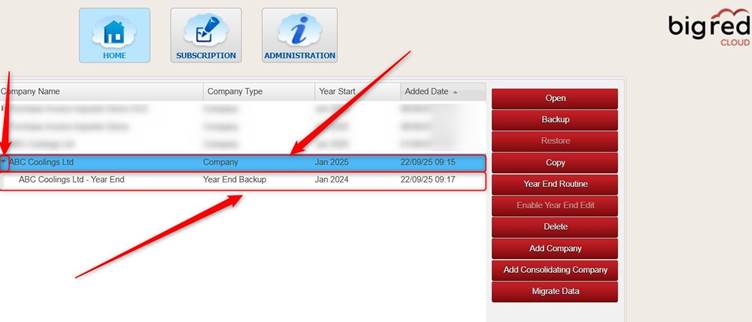
Once the Year End Routine is completed, your New Year should show and underneath it your Year End Backup of your old year should show. Note: if the Year End Backup does not show, simply click the small arrow to the left of the company name and it should show.
Was this article helpful?
That’s Great!
Thank you for your feedback
Sorry! We couldn't be helpful
Thank you for your feedback
Feedback sent
We appreciate your effort and will try to fix the article