The Cash Book is where you enter ALL money that you receive regardless of how you receive it (i.e. whether it is a Bank Payment you receive, a Cheque you receive, or Notes and Coins that you receive etc.). All of this should be entered to the Cash Book. The Cash Book is also where you enter Lodgments to your Bank Account, and where you enter Physical Cash Payments (Notes and Coins) that you make.
- When Opening the Cash Book, first ensure that you are in the correct Month tab.
Its important to ensure you are always in the correct book and the correct month. There isn't a simple way to move transactions between months, so this can help save you from having to delete and re-enter transactions in the correct month.
- The Cash Book is split into 2 sides, the left side or 'CASH IN' and the right side or 'CASH OUT'.
- You really want to think of the left side of the Cash Book as if its a till drawer in a shop in the sense that you can put money into it, keep money in it and transfer money out of it.
- Generally the left Side of the Cash Book or the CASH IN side, is for recording who is paying you, and the right side or 'CASH OUT' side is for recording where you put this money you received.

If we take a look at the snippet above taken from the bottom of the Cash Book screen, we can see Initially the Opening and Closing balances are both 0.
This Opening Balance of 0 means at the start of the currently opened Month we had 0 in the Till.
This Closing Balance of 0 means we currently have 0 in the Till as we are in the current month tab (this closing balance will show the month end figure if we have a previous month tab opened.)
Example 1 (If you have a till and/or don't lodge all incoming money directly to the bank upon receiving).
Lets look at an example of how this would work if you use a till and/or don't lodge money directly to the bank.
Lets say, Marty McBurger (our customer) paid us 100 Euro on the 1st of January and we kept the money in the till until the 10th of January when we then lodged it into our bank.
- We would first ensure we are in the Cash Book, and then ensure that we are in the correct Month (January in this case), and we would then select 'Receipts' on the red bar at the bottom of the screen and get presented with the same window as below.
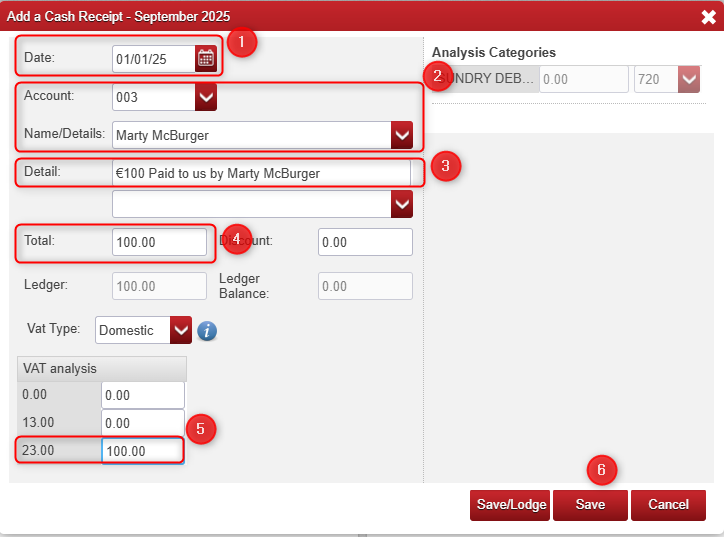
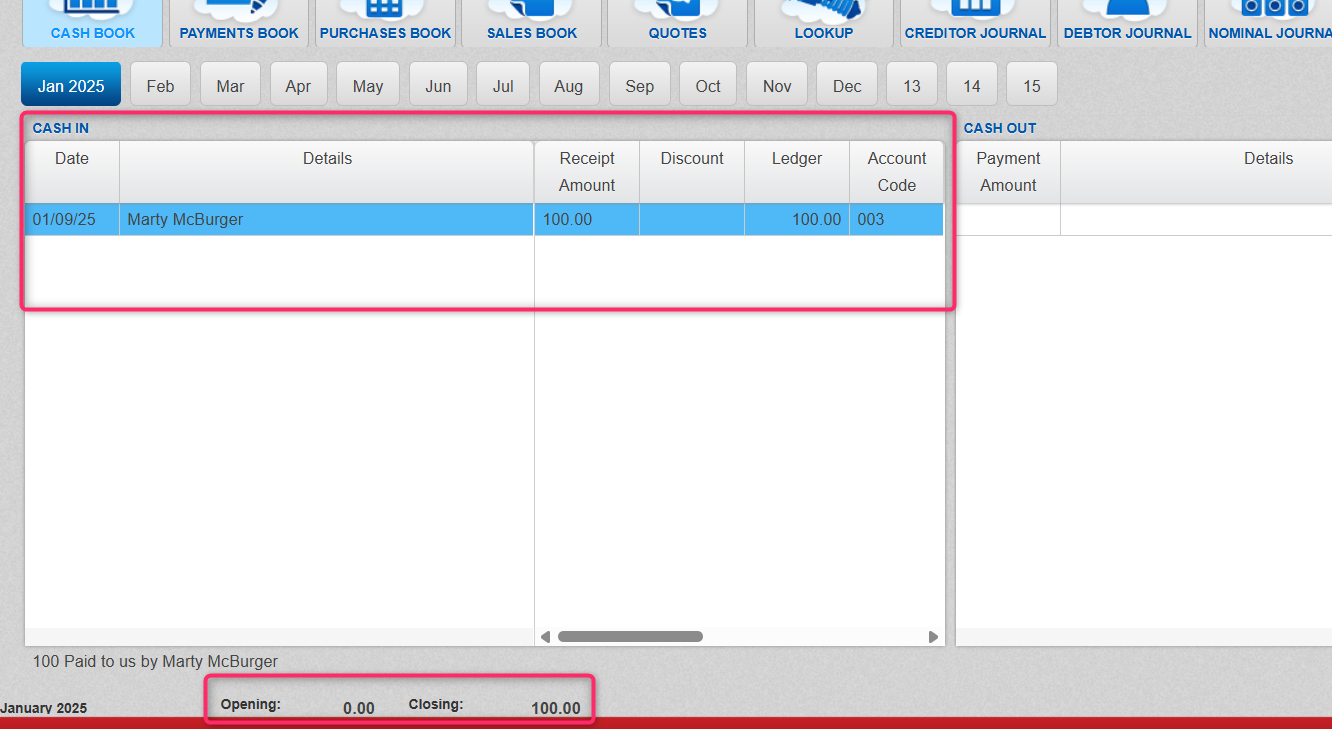
- Fill in the details as above, then click the middle button 'SAVE'. (as this will only create an entry on the left side or 'CASH IN' side of the Cash Book and it will also update the Till Closing Balance to '100' as seen in the screenshot below).

This basically means we currently have 100 EURO currently sitting in our 'Till'.
So we now know that Receipts are for recording who is paying us on the left side of the cash book (CASH IN), so Payments on the right side of the cash book (CASH OUT) must be used for recording where we place the money after the till (i.e. Till > Bank).
- If we click 'Payments' at the bottom of the screen (we don't need to fill out who paid us as we already recorded that on the left side of the Cash Book when we recorded the receipt of payment from the customer), we just need to specify the date (which we know is the 10th of January), which bank we are paying into (I used the CURR or Current account) and the amount (which we know is 100) as below:
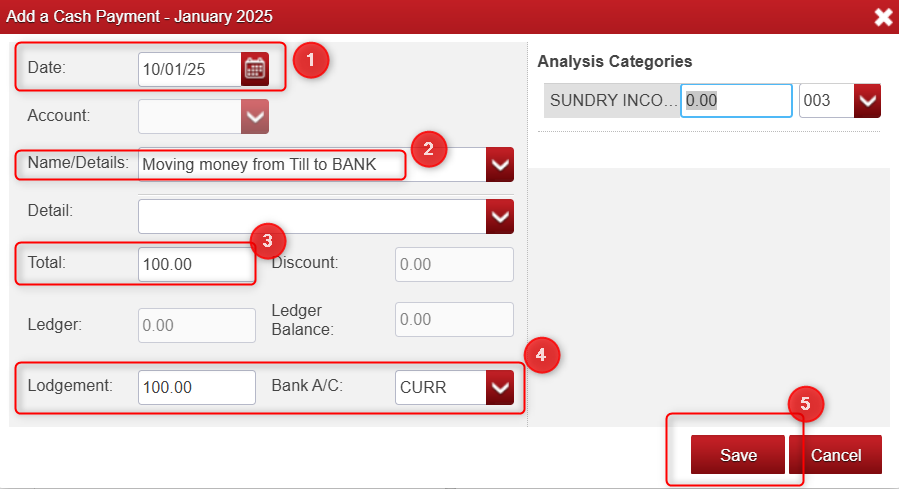
- After clicking 'Save' you will notice the Cash Book closing balance is then reduced back to 0.
------------------------------------------------------------------------------------------------------------------------------------------
Example 2 (All incoming money is lodged directly into your bank).
Lets look at an example of how this would work if you do not use a till but instead just have all money lodged directly to the bank.
Lets say, Marty McBurger (our customer) paid us 100 Euro on the 1st of January and this money went straight into our bank rather than into the till.
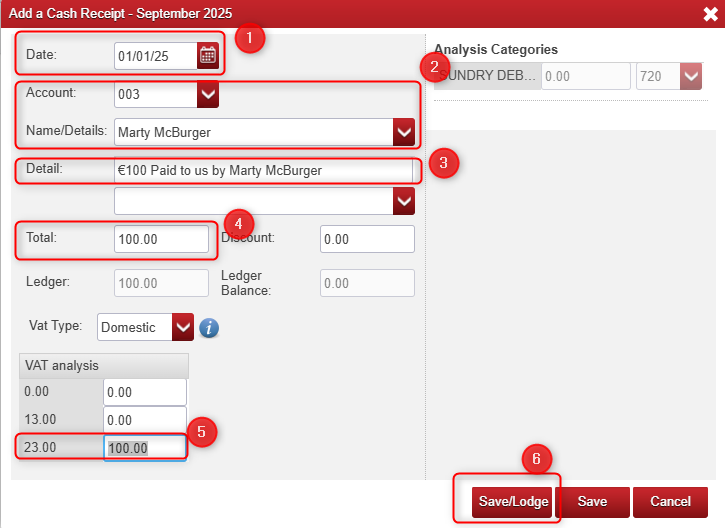
- We would start this similar to the last example by Clicking 'Receipt' at the bottom of the Cash Book, then filling out the details as below, but this time select 'Save/Lodge' rather than 'Save', as this will automatically create a lodgment entry on the right side 'CASH OUT' of the Cash Book along with the Receipt entry on the left 'CASH IN' side.
That is all you need to do, if you always get money directly into your bank, you would use this method and you should never have a closing balance.
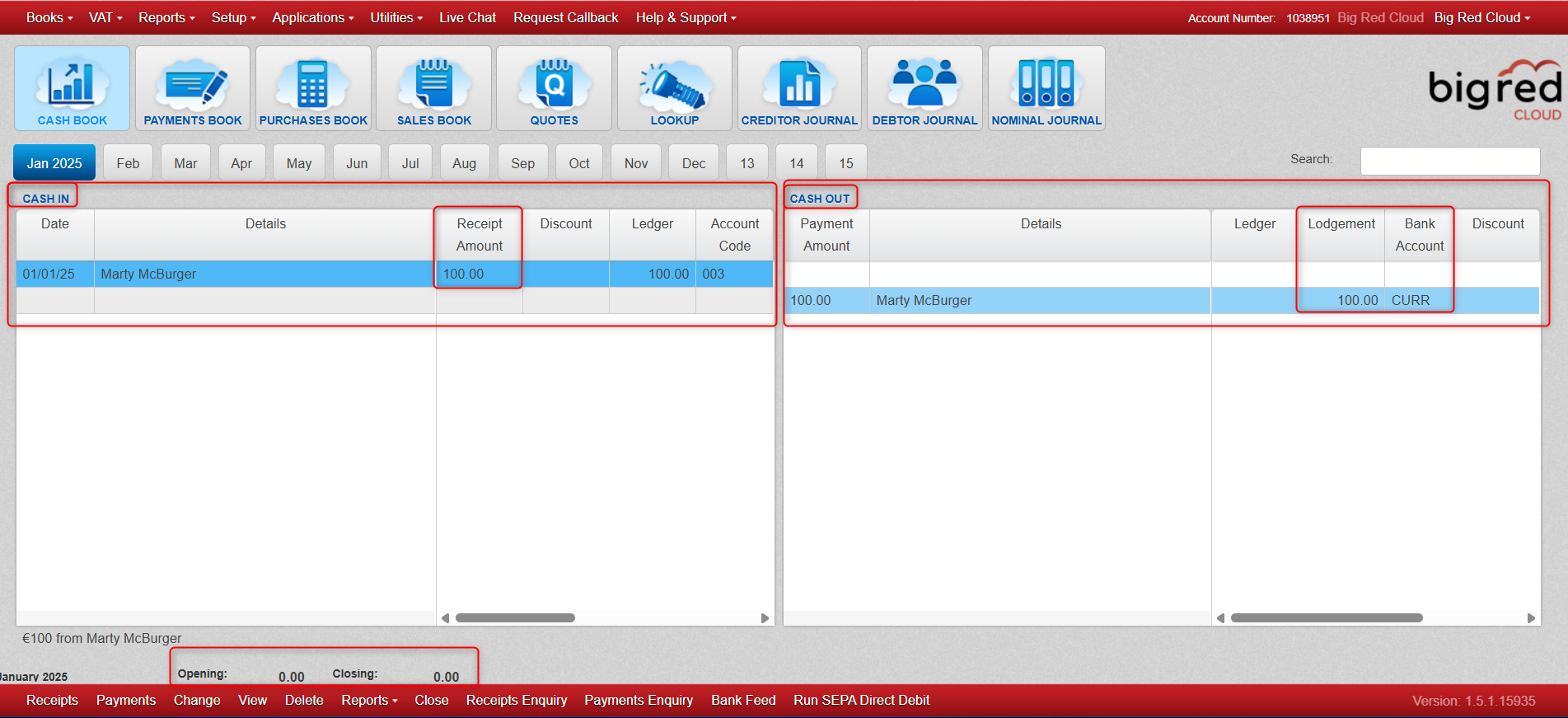
This is how our Cash Book looks after this Cash Receipt has been saved and lodged..
- You can see the Receipt below on the left 'CASH IN side and who paid us.
- You can see the Lodgment of this received money on the right hand 'CASH OUT' side and where we put the money.
- You can see the Opening and Closing balances are both 0.
- This means we started with an Opening Balance of 0 in the 'till'.
- This Closing Balance means we finished with 0 in the 'till'.

--------------------------------------------------------------------------------------------------------------------------------------------------------------
Final points to remember:
- We know you can record a 'Receipt' and click 'Save' to show it only on the left 'CASH IN' side.
- We know you can record a 'Receipt' and click 'Save/Lodge' to show it on the left 'CASH IN' side and the right 'CASH OUT' side.
I just want to point out that you can also just make an entry only on the right 'CASH OUT' side by clicking on 'payment' instead of receipt.
This can be handy if you have already saved a number of receipts and have a built up balance in the till.
If you want to move this entire balance to the bank, you can click 'Payment' at the bottom on the red bar.
Then enter the date and the amount of money you are moving from the till to the bank (all in this case).
When you click 'Save' it will then create this entry on the right CASH OUT' side only and remove the balance from the 'till'.

Was this article helpful?
That’s Great!
Thank you for your feedback
Sorry! We couldn't be helpful
Thank you for your feedback
Feedback sent
We appreciate your effort and will try to fix the article