Postponed Accounting
Postponed accounting for Value-Added Tax (VAT) on imports is available to all traders that are registered for VAT and Customs and Excise. Postponed accounting arrangements may be applied to all imports from third countries, including Great Britain (excluding Northern Ireland), but it is not compulsory.
Postponed accounting enables VAT registered traders to account for the VAT due on imports on their VAT3 Return. Import VAT may be reclaimed at the same time as it is declared, subject to the usual rules on deductibility. This removes the need to pay at the point of importation as it will be a simultaneous in or out accounting transaction.
Traders will have to fulfil certain conditions in order to avail of postponed accounting. They must be able to demonstrate that they comply, when requested to do so by Revenue.
Published: 16 January 2025 on Revenue.ie
All accountable persons who are registered for VAT and Customs & Excise (C&E) at 11:00pm on 31 December 2020 will be given automatic entitlement to Postponed Accounting, so there is no need for these traders to apply for Postponed Accounting. Anyone who falls outside this remit will need to apply with Revenue before being entitled to Postponed Accounting.
Example. Creating a Purchase Invoice and marking it as 'Postponed Accounting'.
- Go into the Purchases Book > Select “Add” (from the red bar at the bottom of the screen).
- Select VAT type as Foreign Non EU and then the Postponed Accounting box appears underneath.
- Tick this box as highlighted below (all other steps are the same as a regular Purchases Book Entry)
Example of a Postponed Accounting Invoice below:
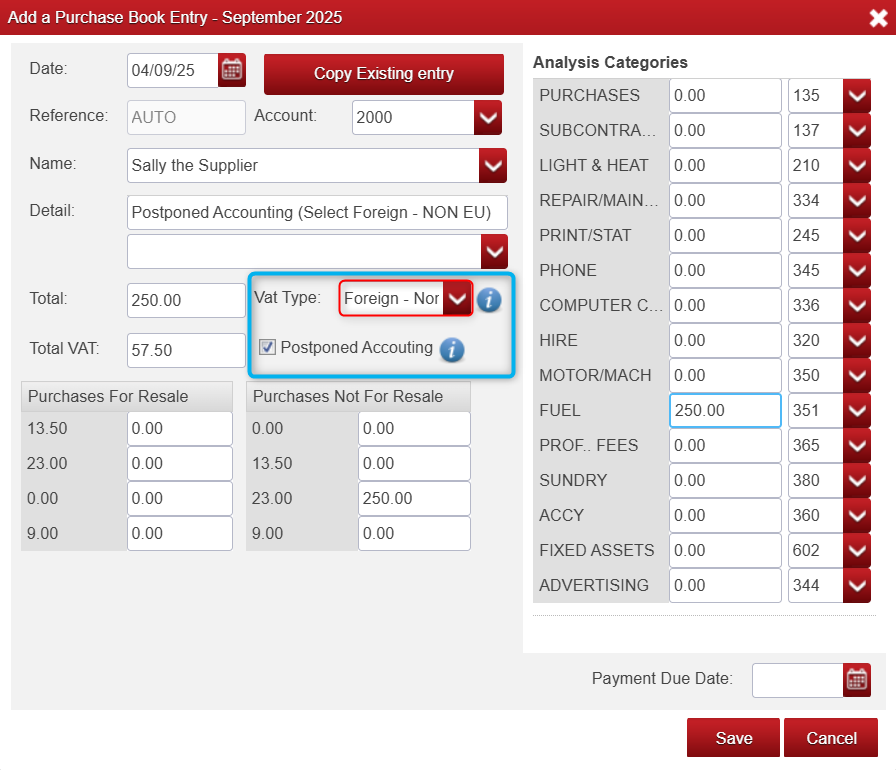
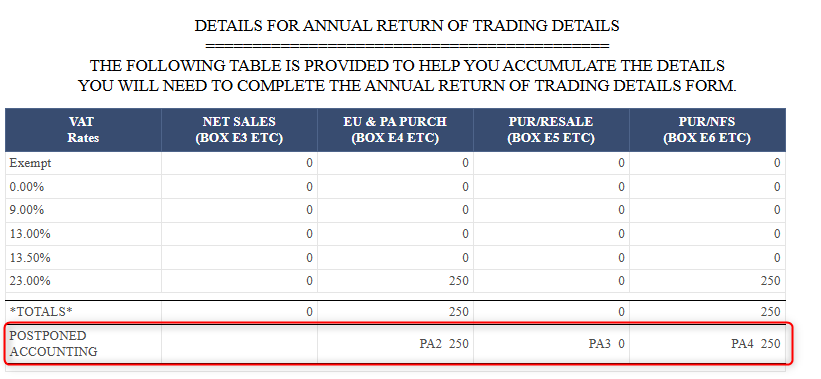
Whatever data is entered in the 'Total' field when Postponed Accounting is ticked, is then pulled into the VAT reports under the heading 'Postponed Accounting'. which will give you the figures you need to provide to Revenue.
- If you go to VAT (Found on the red menu bar at the top of your screen in Big Red Cloud).
- Then select either the Standard Vat Report or the Vat on Cash Receipt report.
- Then select the month/months you would like to be reflected in this report.
- Scroll down to the bottom of the report to find the Annual Return of Trading Details table (as below) to see the Postponed Figure.

Was this article helpful?
That’s Great!
Thank you for your feedback
Sorry! We couldn't be helpful
Thank you for your feedback
Feedback sent
We appreciate your effort and will try to fix the article