To enter a refund on Big Red Cloud, this is done in 2 easy steps.
Step 1.
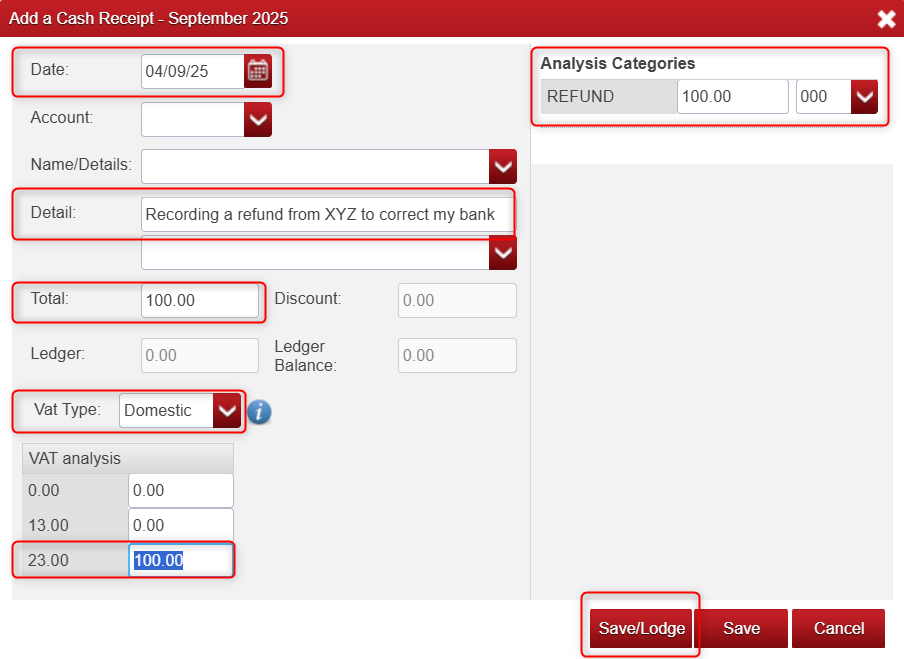
- Go to the Cash Book, record a Receipt for the refunded amount by clicking 'Receipts' at the bottom of the screen on the red bar.
- Don't select any account, this step is just to add the money back into your bank balance, we will rectify the account in Step 2.
- Fill it all the required details and click Save/Lodge (as seen below).
Step 2.
If its a Customer, go to Books > Debtor Journal
If its a Supplier, go to Books > Creditor Journal
Add a Journal for the balance refunded and before saving it, ensure you select the same nominal that you chose when creating the receipt in Step 1.
----------------------------------------------------------------------------------------------------------------------------------
That's all there is to it!, you have successfully entered a refund.

Was this article helpful?
That’s Great!
Thank you for your feedback
Sorry! We couldn't be helpful
Thank you for your feedback
Feedback sent
We appreciate your effort and will try to fix the article