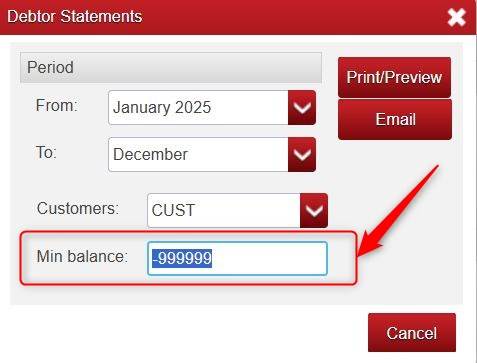
It is possibly the Min Balance (Minimum Balance) box causing this.
This generally defaults to 0.50 meaning that if the customer has a balance under 0.50 (e.g. 0.49) it will not display the statement for them, and you get the blank page.
You can change the Default Min Balance for ALL Customer Statements by clicking Setup > click Options > click Yes.
Scroll down to Default Debtor Statement Minimum Balance and set this to what you want it to be and click Save.

Note: you can even set it as a minus figure e.g. -999999.
You also have the option when Printing/Emailing a statement to change the Min Balance prior to clicking Print/Preview or Email.
Was this article helpful?
That’s Great!
Thank you for your feedback
Sorry! We couldn't be helpful
Thank you for your feedback
Feedback sent
We appreciate your effort and will try to fix the article