Before looking at what can cause a Discrepancy, it’s important to look at how the Bank Reconciliation (Bank Rec) works in Big Red Cloud (BRC). We will then look at what can cause a Discrepancy, and some ways to try to find it.
Month Tab Versus Date box
- We first need to explain the difference between the Month and the Date when it comes to the Bank Rec.
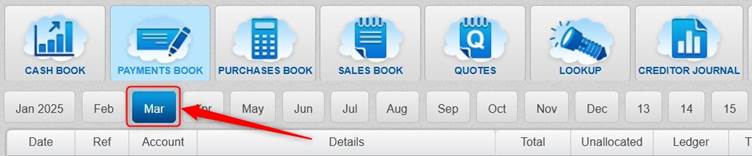
- Before entering a transaction, you would first select the relevant Month tab in the book, and when adding the transaction you would select the relevant Date.
- The Bank Rec works by the Month tab (not by the Date).
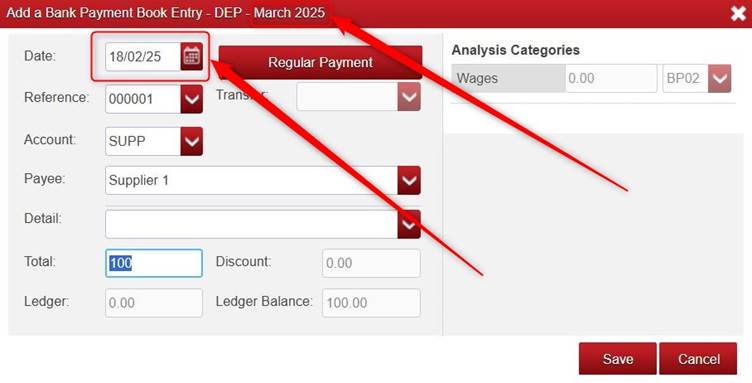
- Example: if you enter a transaction into the March month tab, but with a February Date (e.g. 18/02/25), that transaction would be taken into account in the March Bank Rec, but it wouldn’t be taken into account in February Bank Rec.
- However, when looking at the Bank Ledger, the transactions are displayed in Date order (not in Month tab order).
Example: Month Tab
Example: Date field
Note: while the March tabbed month was selected (shows in the red bar), the date selected was a February date of 18/02/25.
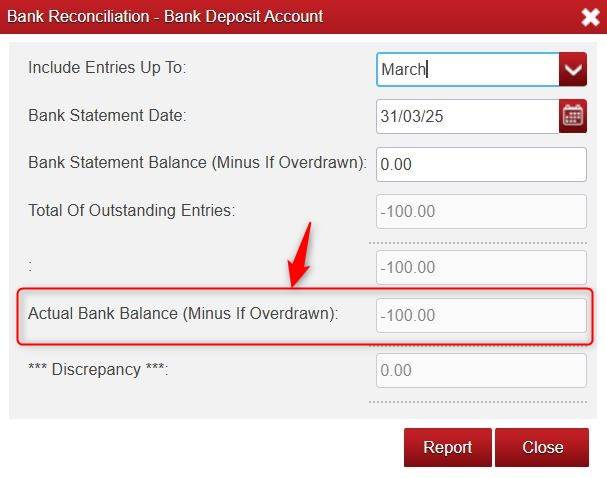
The Actual Bank Balance
- The Actual Bank Balance on the Bank Rec is the Bank Balance according to BRC as of the end of the Month tab that you select in the Include Entries Up To box.
- For example: if you choose March in the Include Entries Up To box, that is the Bank Balance according to BRC as of the End Of March.
- It is calculated by BRC as follows:
- Bank Opening Balance (as entered/carried over in BRC)
- PLUS Lodgements/transfer In
- MINUS Payments out.
- EQUALS Actual Bank Balance
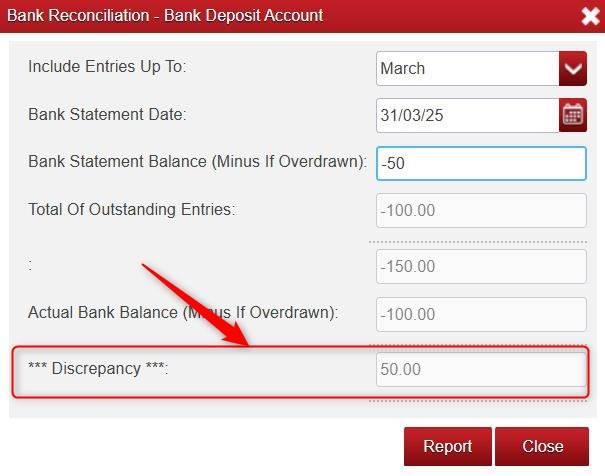
The Discrepancy
- The value of the Discrepancy box in the Bank Rec is calculated as follows:
- Bank Statement Balance (that you manually type in from your real bank statement)
- PLUS Total of Outstanding Entries in BRC
- EQUALS Actual Bank Balance. (If it does not equal, it will give a Discrepancy.)
- Again, these figures are based on the Include Entries Up To tabbed Month, for example if you choose March, then it is up to the end of March.
Some possible causes of a Discrepancy
- An incorrect Bank Opening Balance in BRC (you can check this in Lookup > Bank Accounts > select the relevant bank > View).
- An item ticked (in Lookup > Bank Accounts > highlight relevant Bank > Ledger) where it shouldn’t be ticked.
- An item unticked where it should be ticked.
- An item in the wrong tabbed Month (Bank Rec works by tabbed Month).
- An incorrect value on an item e.g. a typo of €212 where it should be €221 on a transaction.
- An item entered twice (or more) in error.
- An item showing in BRC that doesn’t show on the real Bank Statement.
- An item showing on the real Bank Statement not showing in BRC.
- Please note: a Discrepancy can be caused by one or several transactions or things.
How to try to find a Discrepancy
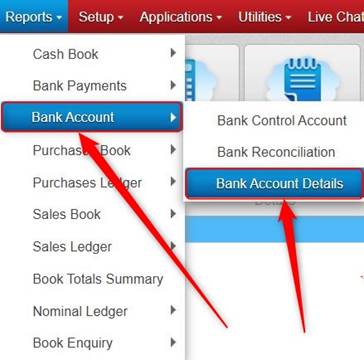
- Run the Bank Account Details report (in Reports > Bank Account) for the Bank and Month(s) in question. This shows the transactions going into and out of the Bank Account according to BRC for the selected Month(s). It will also show which transactions on it are ticked or unticked. You can compare that report to your real Bank Statement to look for differences.
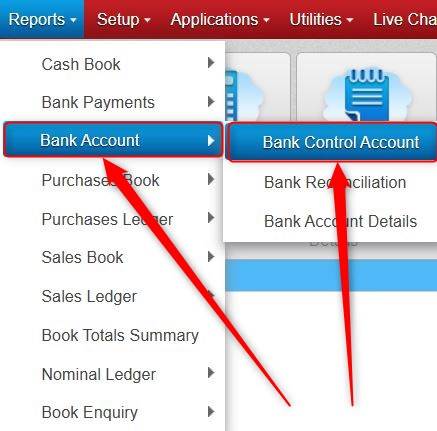
- Run the Bank Control Account report (in Reports > Bank Account) for the Bank and Month(s) in question. This report show an Opening Balance of the From month, and a Total of Lodgements and Transfers In, and Payments Out, and the Closing Balance for the ‘To’ tabbed Month. It may help highlight what area the Discrepancy is coming from e.g. it might just be coming from the Lodgements area.
If it is still not clear what is causing the Discrepancy
- You can try to find the Month that the Discrepancy starts, to try to narrow it down.
- If say the Bank Rec for March is giving a Discrepancy, you could try to reconcile February.
- If February gives no Discrepancy, it then indicates that the Discrepancy starts in March.
- But, if February gives a Discrepancy, then you could try to reconcile January to see if that gives a Discrepancy.
- At some point, it may get to a Month where there is no Discrepancy. In that case, it indicates the Discrepancy begins the month after that.
- To go back to reconcile an earlier Month, you would untick the transactions for that month (e.g. February) (in Lookup > Bank Accounts > highlight relevant Bank Accounts > Ledger) and untick the transactions for any Month after that (e.g. March, April etc.). You would then do your Bank Rec for that Month (e.g. February) and tick only what transactions went through by the end of that Month (i.e. what transactions went through by the end of February in this example).
Was this article helpful?
That’s Great!
Thank you for your feedback
Sorry! We couldn't be helpful
Thank you for your feedback
Feedback sent
We appreciate your effort and will try to fix the article