Open Banking with Big Red Cloud is very straightforward to use and can really help you keep your books up to date with minimal effort. Rather than recording all incoming and outgoing payments individually in the individual books you can pull in a list of all transactions for a specified time and make your way down through the list of transactions and simply point them to the correct place in Big Red Cloud.
Open Banking is a financial services initiative that allows consumers and businesses to securely share their financial data with authorized third-party providers like Big Red Cloud through standardized and regulated application programming interfaces (APIs).
Getting Started
There is 2 different ways you can use the Bank Feeds in Big Red Cloud, via Open Banking or Via .CSV Files.
- Open Banking: Securely connects directly to your Bank through 'Plaid'
Allows you to pull your bank statements directly into Big Red Cloud. This does not allow any access to make or recieve payments via Big Red Cloud, this is strictly for pulling in banking statements only.
Open Banking is the preferred method of using the Bank Feeds for the majority of Big Red Cloud users.
- .CSV Bank Files: This requires a file you would request from your bank with a list of transactions for a specified period.
You would then upload the file to Big Red Cloud, and you would manually map the columns of the .CSV file to the columns required for it on Big Red Cloud.
This method would be less used by Big Red Cloud Customers but will work where Open banking is not an option.
I'm going to be using Open Banking today in this example so we will focus only on the top half of this screen shown below.
- Log into your Big Red Cloud company,
- Go to 'Setup' and then down to 'Bank Feeds'
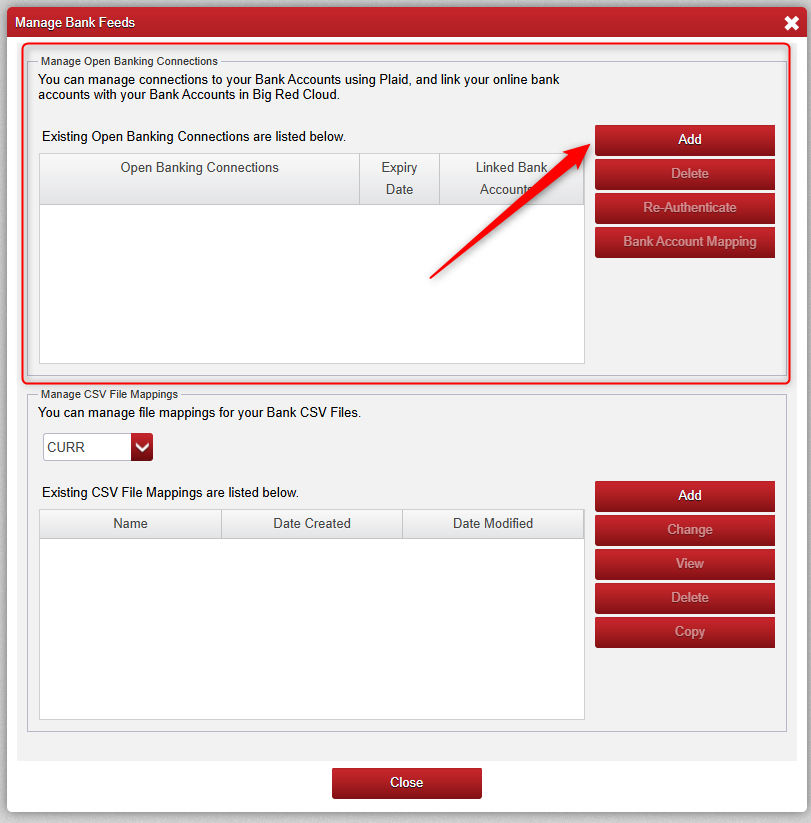
You will then be presented with the below screen.
- The top half of the screen is for Open Banking, here we start by clicking 'Add' as indicated below by the red arrow.
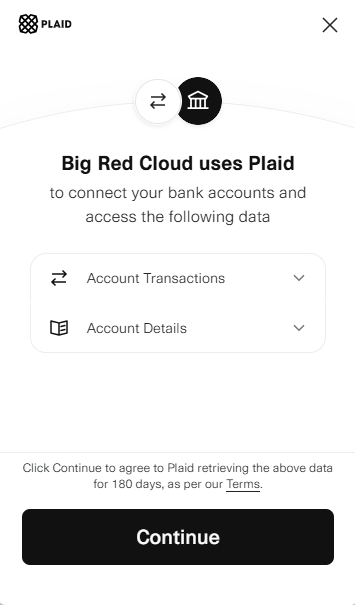
- After Clicking 'Add' above we will be presented with the below screen for Plaid.
Plaid is a service that securely connects users financial accounts to apps and services, acting as a secure intermediary for financial data.
It is the industry standard for financial programs.
It allows users to securely link their banking and other financial accounts to Big Red Cloud to facilitate accurate transaction entry.
Some users wont see any available bank accounts to select when initially logging in through Plaid, if this is the case for you, you will need to contact your banking institution and ask them to make your accounts eligible for Open Banking before completing this step. This is straightforward and something they would be familiar with having to do.
- After we click 'Continue' above we will be presented with the below screen where we can choose our Financial Institution and then authenticate access via your Bank Account.
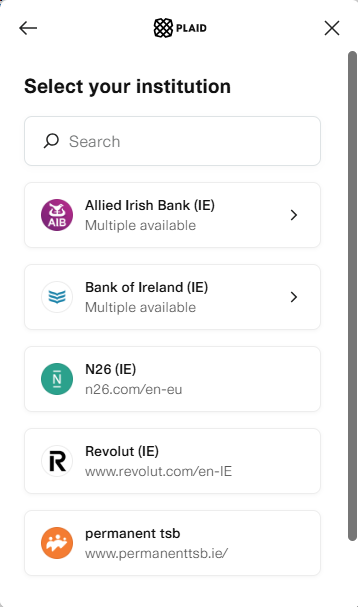
Once signed into your Bank/Financial Institution you should see any bank accounts that are available to be added through Open Banking listed with the option to select them.
Once you have selected the accounts relevant for your Big Red Cloud, hit complete & you are now ready to start importing transactions into Big Red Cloud using the Open Banking feature.
Bank of Ireland users please note:
- Log into your Business On Line account
- Go to User Centre > User Group Settings
- Under "Open Banking Processes - Third Party Access", enable the option "Allow Data Sharing with Third Party".
Once this setting is applied, you should be able to connect successfully.

Was this article helpful?
That’s Great!
Thank you for your feedback
Sorry! We couldn't be helpful
Thank you for your feedback
Feedback sent
We appreciate your effort and will try to fix the article