Construction industry / Principal Contractor guidance — Republic of Ireland only
1. Overview
Reverse Charge VAT is a mechanism that applies to the Republic of Ireland only, most commonly encountered under the Relevant Contracts Tax (RCT) rules for the construction industry. It shifts the responsibility for accounting for VAT from the subcontractor (the supplier) to the Principal Contractor (the customer).
As a Principal Contractor, you may receive an invoice from a subcontractor that shows no VAT charged, but instead carries a statement such as:
Invoice wording to look out for “VAT on this supply to be accounted for by the Principal Contractor.” |
No VAT is charged on the invoice itself — but you, as the Principal Contractor, are still required to account for the VAT that would normally have applied to the supply.
2. One-Time Setup: Credit Input for Reverse Charge VAT
Before processing reverse charge invoices, check whether your company is entitled to reclaim (Credit Input) the VAT on this type of purchase — i.e. whether you would normally be able to claim back VAT on a sale of this kind.
- Go to Setup, then Options.
- In the VAT Options section, locate ‘Credit Input for Reverse Charge VAT?’
- If you are entitled to reclaim the input VAT, tick the box.
- Click Save.
Screenshot: Setup → Options, VAT Options section, showing the ‘Credit Input for Reverse Charge VAT?’ tickbox.
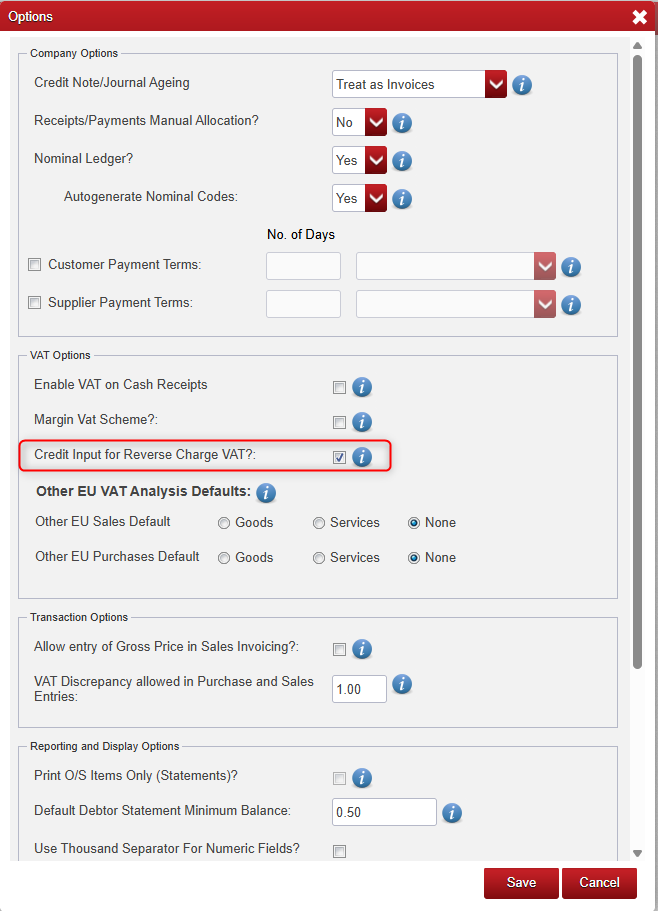
Why this setting matters This option controls whether the VAT amount is also treated as an input credit (T2 Purchases) in addition to being treated as output VAT (T2 Sales) on the VAT Return. If you are not entitled to a credit input, leave this option unticked. |
3. Entering the Subcontractor Invoice
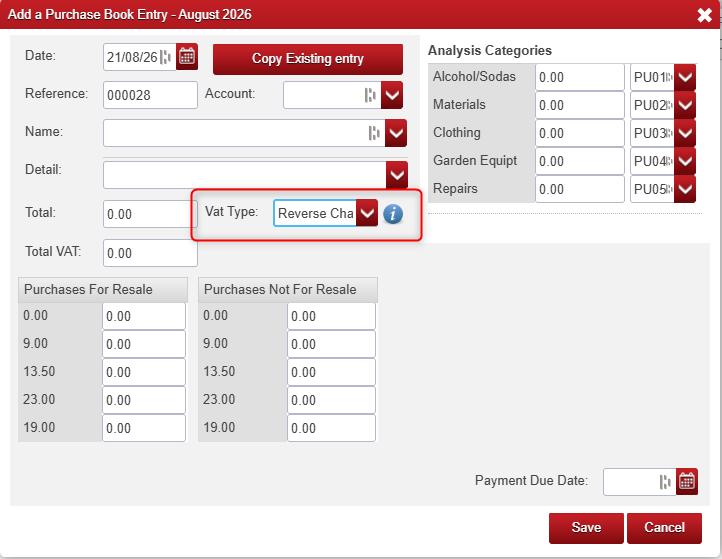
When entering a reverse charge invoice from a subcontractor in the Purchases Book:
Field | What to enter |
Book | Purchases Book |
Supplier | Subcontractor's supplier account |
VAT Type | Reverse Charge |
Net / Total on invoice | As shown on the subcontractor's invoice (no VAT included) |
VAT amount | The VAT that would normally apply to the transaction (enter manually — it is not on the invoice) |
Result | VAT is not added to the Total payable, but is captured for the VAT Return |
Key points when entering the transaction:
- Select VAT Type: Reverse Charge for the transaction line.
- Enter the VAT amount that would have applied had the supply been invoiced normally — this figure will not appear on the supplier's invoice, so it must be calculated and entered manually (net amount × applicable VAT rate).
- The VAT amount is not included in the invoice Total and does not affect the amount payable to the subcontractor.
- The VAT amount is still captured by Big Red Cloud for VAT Return purposes.
Screenshot: Purchases Book entry screen, showing the VAT Type field set to Reverse Charge.
4. How Reverse Charge VAT Appears on the VAT Return
Once entered correctly, Big Red Cloud automatically reflects the reverse charge VAT on the Standard VAT Report as follows:
VAT Return box | Treatment |
T2 — Purchases | Reverse charge VAT is always included here automatically, on every reverse charge entry. |
T2 — Sales | Also included here, but only when ‘Credit Input for Reverse Charge VAT’ is ticked in Setup / Options. |
In practice:
- If you are entitled to reclaim the VAT (option ticked): the same VAT amount appears in both T2 Sales and T2 Purchases, so the net effect on the amount due/reclaimable is nil — but the transaction is correctly disclosed on the return.
- If you are not entitled to reclaim the VAT (option unticked): the VAT amount appears only in T2 Purchases, correctly increasing your VAT liability for that period.
5. Worked Example
A subcontractor issues an invoice for €1,000 net for construction services, marked “VAT on this supply to be accounted for by the Principal Contractor.” The applicable VAT rate is 13.5%.
- Calculate the reverse charge VAT: €1,000 × 13.5% = €135.00
- Enter the purchase invoice in the Purchases Book with Net = €1,000.00, VAT Type = Reverse Charge, VAT amount = €135.00.
- The invoice Total remains €1,000.00 — this is the amount owed to the subcontractor.
- On the VAT Return: €135.00 is included in T2 Purchases automatically. If ‘Credit Input for Reverse Charge VAT’ is ticked, €135.00 is also included in T2 Sales.
6. Quick Reference Checklist
- Confirm the invoice is genuinely a reverse charge invoice (no VAT shown, RCT wording present).
- Confirm whether ‘Credit Input for Reverse Charge VAT?’ should be ticked in Setup / Options (once-off, per company).
- Enter the invoice in the Purchases Book with VAT Type = Reverse Charge.
- Calculate and enter the VAT amount manually — it will not be on the invoice.
- Confirm the invoice Total excludes the VAT amount.
- Review the Standard VAT Report to confirm the amount appears correctly in T2 (and T1/T2 Sales, if applicable).
7. Important Notes
- This treatment applies to Republic of Ireland companies only.
- Reverse Charge VAT Type should only be used where the supplier's invoice explicitly states that VAT is to be accounted for by the Principal Contractor.
- The VAT amount entered must reflect the rate that would normally apply to the goods or services supplied.
- If in doubt about whether a transaction qualifies for reverse charge treatment, or about your entitlement to Credit Input, check with your accountant or Revenue guidance on RCT / VAT reverse charge for the construction sector.

Was this article helpful?
That’s Great!
Thank you for your feedback
Sorry! We couldn't be helpful
Thank you for your feedback
Feedback sent
We appreciate your effort and will try to fix the article